Close a loan early (preclosure)
Settle a disbursed loan before its end date, with an optional interest waiver and a typed reason.
A preclosure closes a loan before its last instalment. The customer pays the closing value, or a little less if you waive part of the next instalment's interest. The loan then closes for good.
Before you start
- Open your teller session.
- The loan must be disbursed. Preclosure only appears on a disbursed loan.
- If you plan to waive interest, agree the reason first. You must type it.
Open the preclosure
Open the loan from Loan Portfolio, select Actions, then Preclosure. The Loan preclosure dialog opens. Nothing is posted yet.
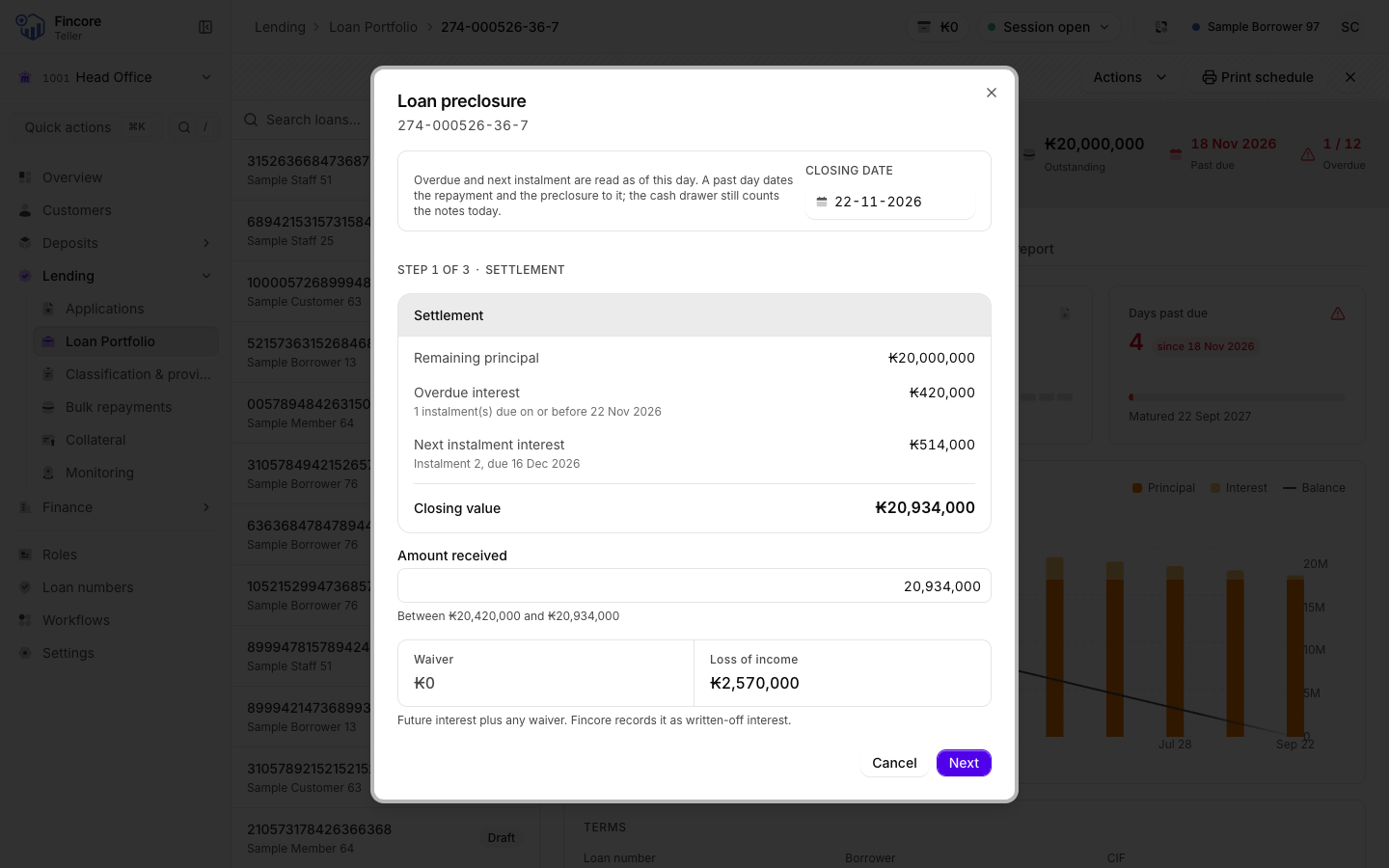
Check the closing date
The Closing date is today. If the customer actually paid on an earlier day, pick that day. It is marked Backdated, and the figures are read again for that day. A future day is not offered. The date is locked once you leave the first step.
Check the settlement
The Settlement step lists:
- Remaining principal
- Overdue interest, for every instalment due on or before the closing date
- Next instalment interest
- Closing value, the total
Amount received starts at the closing value. To waive interest, lower it. The lowest amount allowed is shown under the field: you can waive only up to the next instalment's interest. The Waiver and Loss of income update as you type.
If there is a waiver, fill in Reason for the waiver. You cannot go on without it. Select Next.
Take the payment
Under Payment for, choose Auto (the usual choice) or Interest only.
Then choose Cash and count the notes, which must equal the amount received, or Bank and choose the bank account the money went into. For bank, the account is required. Select Next.
Confirm and close the loan
The last step shows the Fincore postings: a Repayment for the interest, then the Preclosure for the remaining principal. It also shows the closing date, the loss of income and any waiver with its reason.
Read the warning: the loan closes permanently and cannot be reversed. Select Close the loan.
Print the receipt
When the dialog shows Loan closed, select Print receipt and give the receipt to the customer. Then select Done.

Good to know
- Loss of income is the future interest the bank will not receive, plus any waiver. The core banking system records it as written-off interest.
- After closing, the loan's schedule shows every instalment as paid.
- A backdated preclosure dates the postings to the closing date. Your cash drawer still counts the notes today, because you hold them today.
- For a bank payment, the screen may post an extra correction after the loan closes, to move the principal to the bank account you chose. When the core banking system already booked the principal to a bank account, no correction is needed. The result screen says which happened.
If something goes wrong
- Repayment posted — loan not closed: the interest repayment was posted, but the loan did not close. Your cash drawer is not changed. Do not try again straight away. Reopen the loan, read the new figures and ask your supervisor.
- Not confirmed — it may have posted or No answer — it may have posted: the screen did not get an answer. Do not post again. Reopen the loan and check whether it closed.
- If the result screen says the bank correction failed or could not be found, tell your accountant. It must be posted by hand. If it says the correction did not confirm, it may have posted: the accountant searches the journals for the reference shown before posting anything.
Your bank may differ
Whether bank payments are offered depends on your bank having bank accounts set up for the app.