Take a loan repayment
Record a customer's loan repayment in cash or by bank transfer and hand over the receipt.
Use the repayment dialog when a borrower pays an instalment, part of one, or catches up on arrears. The core banking system decides how the money is applied, unless you choose principal only or interest only.
Before you start
- Open your teller session. A repayment is refused while your session is not open.
- For cash, have the customer's notes in front of you so you can count them.
Open the repayment dialog
Open the loan from Loan Portfolio and select Actions, then Record repayment.
You can also start from the Today or Overdue tab of the portfolio: each row has its own Record repayment button. See Loan portfolio and today's worklist.
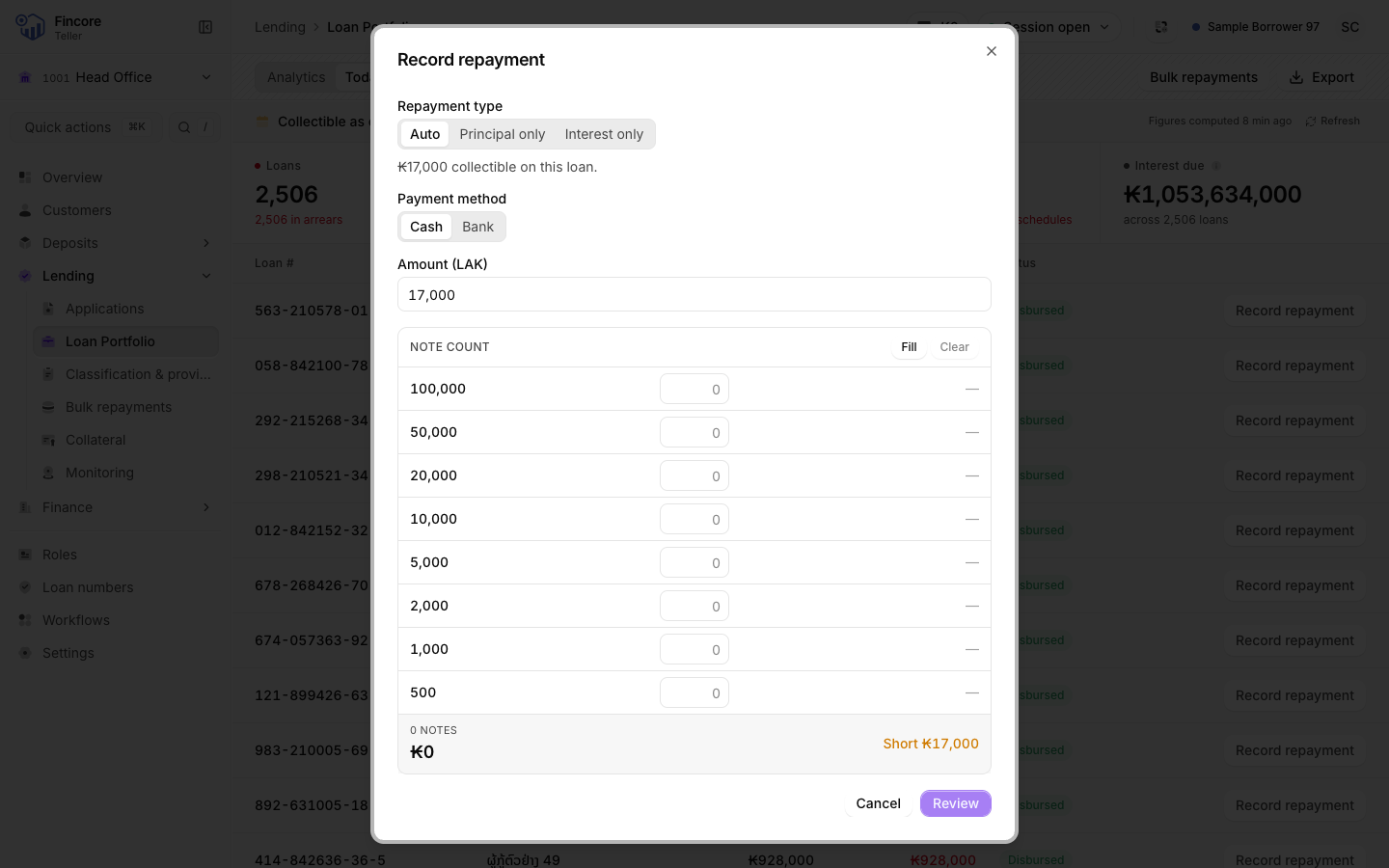
Choose the repayment type
Under Repayment type, choose one:
- Auto: the usual choice. The core banking system applies the money to the oldest unpaid instalment first. The amount starts at the instalment due.
- Principal only: all of the money goes to principal.
- Interest only: all of the money goes to interest.
The line under the switch shows what is due, or how much principal or interest is still owed.
Enter the amount
Check or type the Amount (LAK). With Auto, you can take less or more than the instalment. If the amount differs from the instalment, the dialog warns you before you post. With principal only or interest only, the dialog stops you if the amount is more than what is still owed.
Choose cash or bank
Under Payment method, choose:
- Cash: count the notes the customer handed over in the note grid. The count must equal the amount. Select Fill to propose a breakdown, then correct it to the notes you actually hold.
- Bank: choose the Bank / check account the money went into and, if you have it, the Bank reference from the bank slip. No cash crosses the counter and your drawer does not change.
Post the repayment
Select Record repayment. When the core banking system accepts it, the dialog shows the amount recorded, the payment method and the repayment type.
Print the receipt
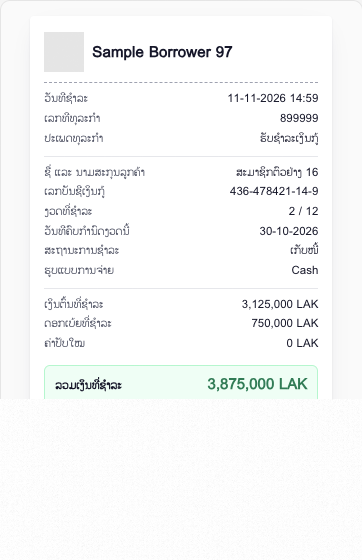
The Receipt appears in the dialog, read back from the core banking system. Select Print receipt and give it to the customer. Then select Done.
Good to know
- The receipt is printed in Lao, whatever language your screen is in.
- A cash repayment is added to your cash drawer only after the core banking system accepts it.
- If the repayment pays off the last instalment, the loan closes. The receipt stays on screen so you can still print it.
If something goes wrong
- If the dialog says your teller session is not open, open your session and try again.
- If the dialog says the posting was accepted but the balance could not be confirmed, do not post again. Reopen the loan and check its statement.
- If the receipt could not be produced, do not write a receipt by hand. Find the transaction in the loan's statement and ask your supervisor.
Your bank may differ
Your bank may add a step to the dialog, such as checking the customer with an OTP code, a fingerprint or a signature. When it does, the dialog shows that step before you post, and the receipt records which check was used.